Seeing is huge. Anything that you can do that lets you see what's happening in a system with more detail or more quickly will help you master that system. Do you want to understand how your lawn mower works? Remove the hood.
Python programming can be a pleasure, partly because it's simple to see what you're doing. If you want to understand a little snippet, you just take it to the interpreter, run it, and get an output. Edit it and get a new output.
Some effects are trickier to see because they are contextual. That is, your snippet won't do the same thing if you paste it into the interpreter as it will in the environment where it's meant to live. This is particularly true for me when I'm working with Django code, which often depends on a Django environment.
The Django shell (./manage.py shell) solves part of this problem. The Django Extensions shell (./manage.py shell_plus if you've installed the Django Extensions app) can take you further. But even then if you have code that depends on the actual location of a file, for example, you can't test it in the shell directly.
To get around that issue, I've typically done two different things in the past: 1) run the code in a test and use print statements or ipdb to get the information that I want, or 2) figure out how to reload the interpreter every time I update a module.
This post celebrates the fact that I just learned how to do 2 much more efficiently than before. So here it is -- effortless ipython reload:
Showing posts with label ipython. Show all posts
Showing posts with label ipython. Show all posts
Thursday, April 6, 2017

Friday, January 30, 2015
A couple of little tricks that make me happy
1. You can drag and drop a folder onto your terminal to get it's path. This is shown here on a Mac (from a blog I just read) but I just tested it on my Ubuntu/Unity 14.04 and it worked nicely.
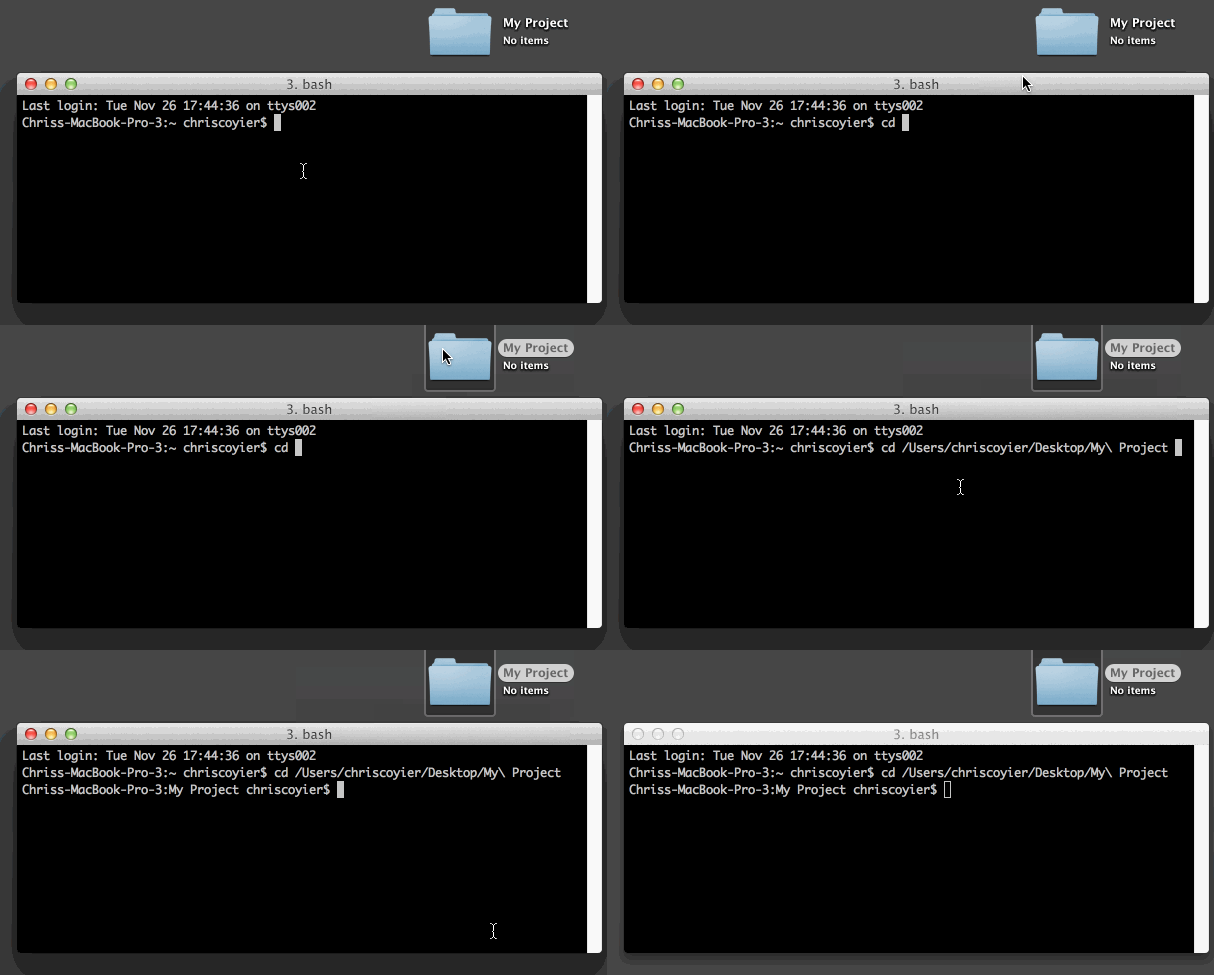
2. If you want to get back to the directory where you just were, type
$cd -
Finally, one other cool thing: the commands that you use to get around on the command line (CTR-a to go to the beginning, CTR-w to erase the word left of our cursor, etc) work in iPython as well.
2. If you want to get back to the directory where you just were, type
$cd -
Finally, one other cool thing: the commands that you use to get around on the command line (CTR-a to go to the beginning, CTR-w to erase the word left of our cursor, etc) work in iPython as well.
Friday, November 7, 2014
Celebrating awesomeness: python request library and Uniprot
Uniprot makes is super easy to get protein sequences from a url.
The python request library by the awesome Kenneth Reitz makes it super easy to get the contents of a url.
Here's a screenshot from iPython:

The python request library by the awesome Kenneth Reitz makes it super easy to get the contents of a url.
Here's a screenshot from iPython:
Subscribe to:
Posts (Atom)